Broker
One of the use cases that Nexus supports is a broker platform — a portal or app where customers can buy and sell cryptocurrencies. Nexus handles the lower-level mechanics of crypto exchanges, transaction execution, and compliance. Call the Nexus APIs to initiate and manage these operations.
Another advantage of using Nexus as a middleware layer is the customer experience: when a hot wallet holds sufficient funds, a customer purchase can result in near-instant delivery. To automatically maintain sufficient hot wallet funds, see the Tradebot.
Broker buy and sell transactions run on the custodian transaction backend by using the BROKERBUY and BROKERSELL transaction types. This keeps the broker business flow, while the API responses and lifecycle states align with the custodian transaction model.
Below you can see a general diagram showing how this model would work for you and your customers.
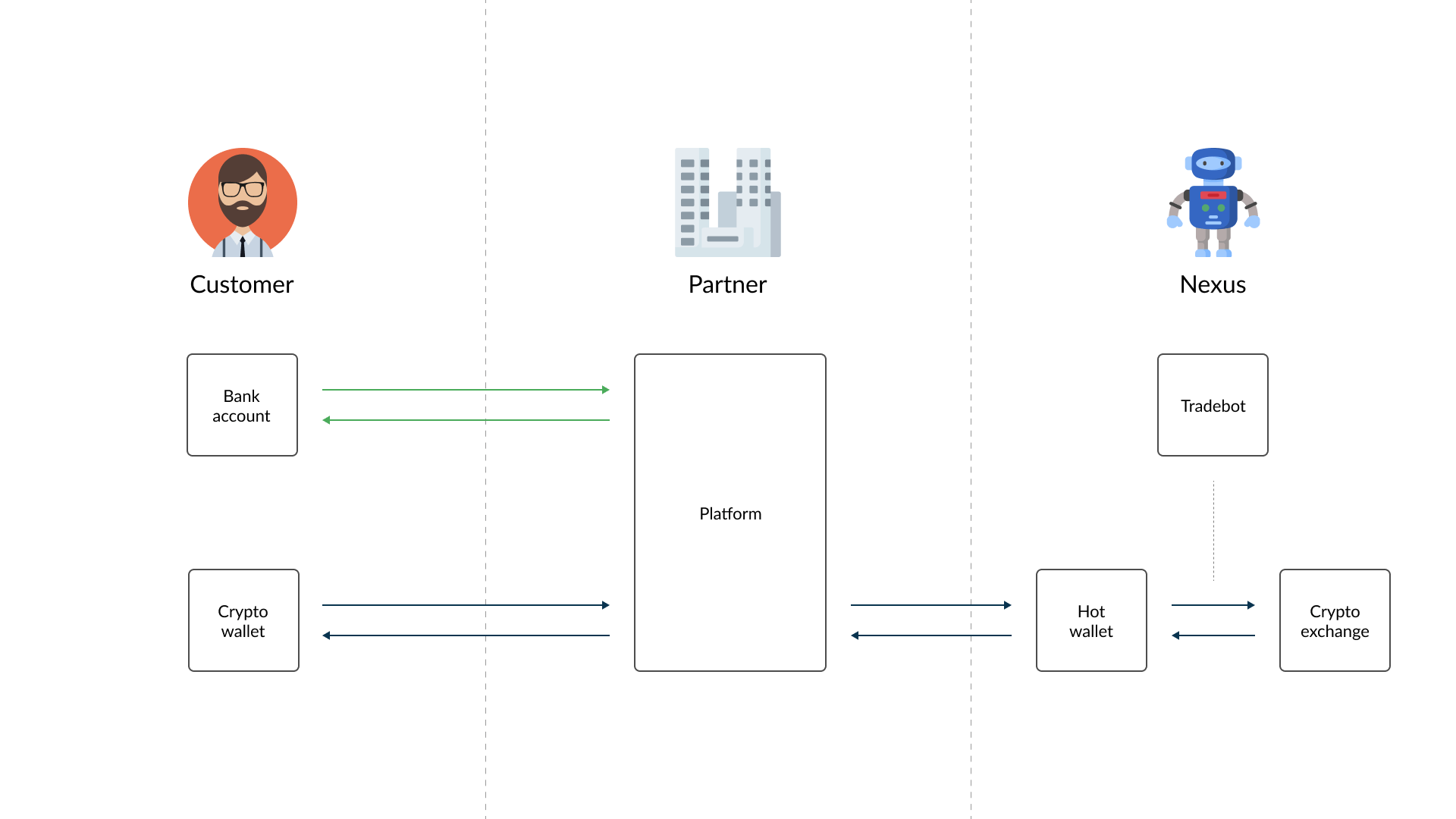
One important aspect of the broker model is compliance risk: crypto-currency can be received from external sources, which means a higher risk level must be accounted for and more thorough compliance checks are required to prevent fraud and losses.
Account
This term in Nexus has a different meaning from the usual one. When we talk about an Account, we mean a pair of Withdraw and Deposit address, explained in more detail in the subsections below.
Native Accounts
An account using the native crypto of its blockchain, e.g. ETH on Ethereum.
Non-Native Accounts
An account able to use a non-native crypto on its blockchain, e.g. USDT on Ethereum, in addition to its native crypto.
Withdraw address
The withdraw address is provided by the customer when creating an account. It is their private wallet address where bought crypto-currency is sent.
Deposit address
Upon the creation of an Account, Nexus automatically assigns a deposit address to couple together with the withdraw one. This address will be used to receive the crypto send by the customer.
Transactions
Buy
What happens when one of your customer wants to buy crypto-currency on Nexus? The figure below describes on a high level the workflow needed to accomplish that.
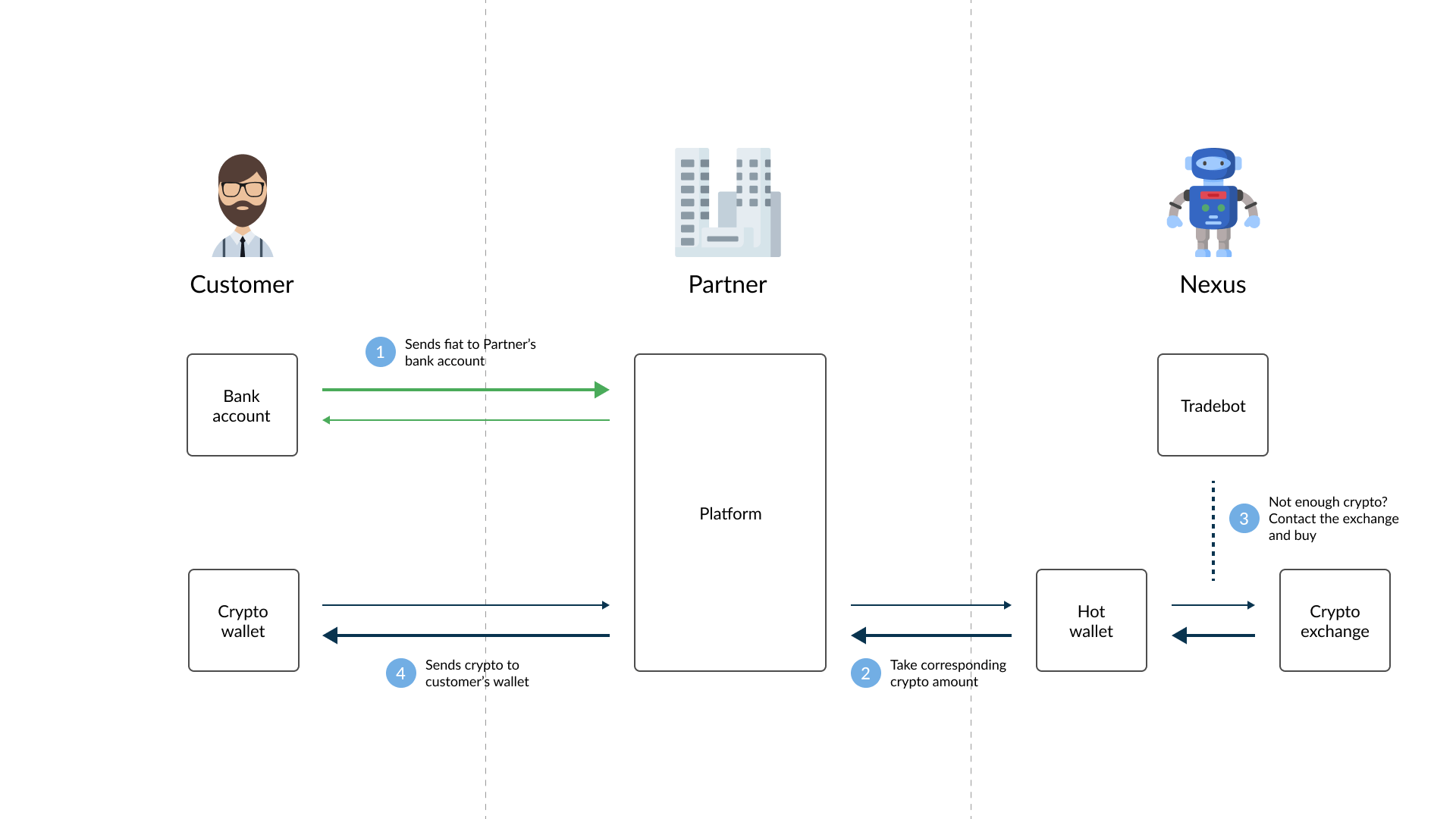
In the custodian-backed broker flow, a buy transaction uses the BROKERBUY type and returns custodian transaction states.
Simulated: returned by the simulation endpoint only. No transaction is persisted.Staged: optional intermediate state when the transaction is created with staged execution. A separate commit call is required before Nexus starts the blockchain send.Sending: Nexus has accepted the buy and is processing the on-chain transfer to the customer's destination address.ToCancel: a cancellation was requested while the blockchain send is still in progress.Cancelled: the buy was cancelled before completion.Completed: the blockchain transfer succeeded and the buy is finished.Deleted: the transaction cannot proceed because the account was no longer active before completion.
For BROKERBUY, the crypto is sent directly to the destination address. No custodial customer balance is created as part of the broker buy flow.
BROKERBUY does not use a separate Blocked status in this lifecycle.
NOTE
After each transaction status update, a callback function is offered by Nexus to your backend system. The callback URL can be set for each Payment method in the settings.
Sell
After buying crypto-currency, a customer may want to sell and receive the corresponding fiat amount in their bank account. The figure below shows the required steps.
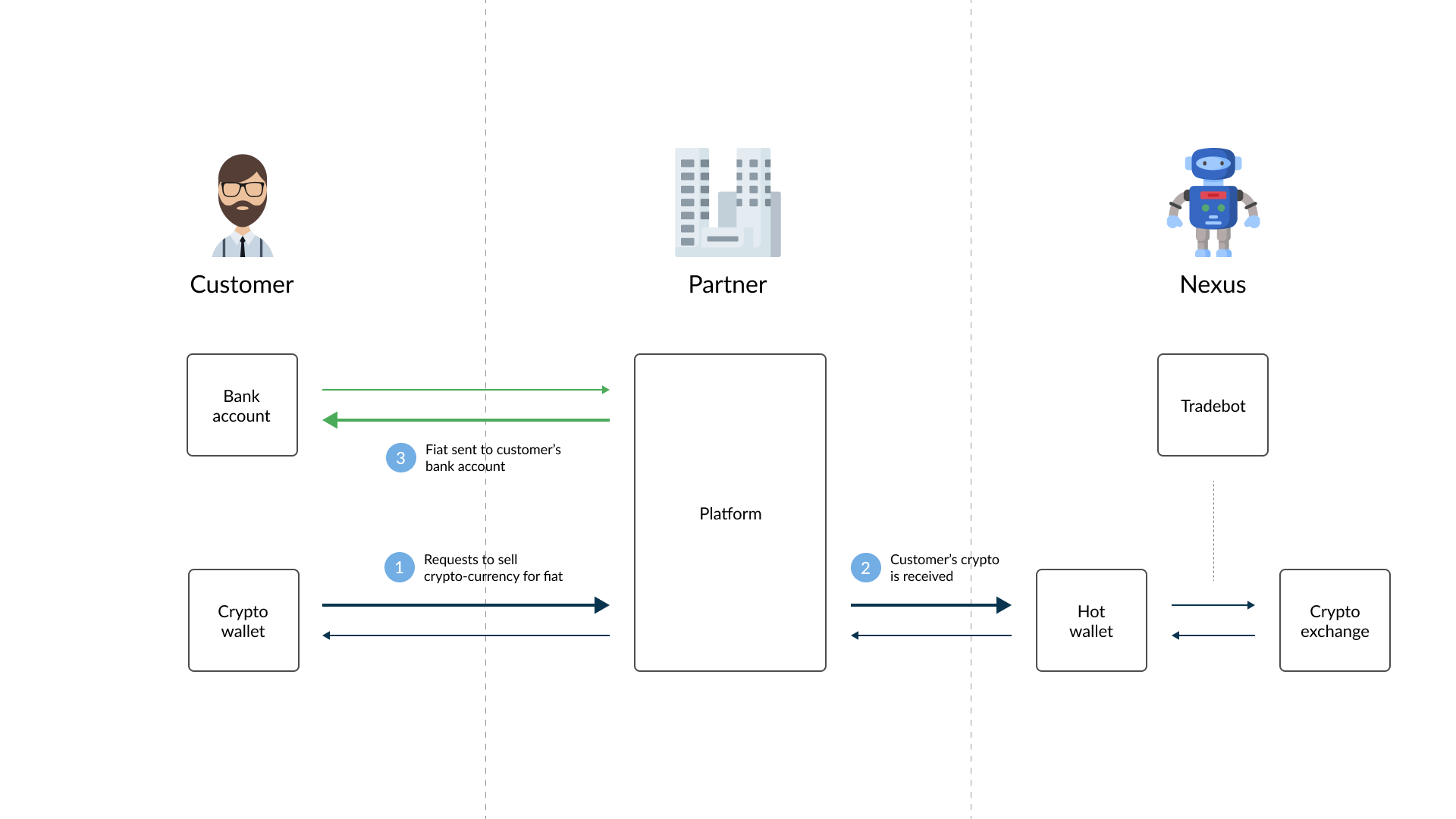
As with the buy transaction, selling crypto-currency also follows a defined lifecycle. The customer first receives a single-use payment request address and the sell transaction uses the BROKERSELL type.
The values below use the broker status names exposed by the API. In this flow, Nexus uses status names such as Initiated, Cancelled, and Completed.
Simulated: returned by the simulation endpoint only. No transaction is persisted.Initiated: the payment request has been created and Nexus has reserved the quoted payout values for the configured payment method window.Confirming: Nexus detected the incoming blockchain payment and is waiting for enough confirmations.ToPayout: the crypto is confirmed and the fiat payout can be processed. This state is used when the LabelPartner has the Payouts feature enabled.PayoutConfirming: optional intermediate state for a 4-eyes payout process.Cancelled: the payment request was cancelled or expired without a valid incoming payment.Completed: the sell is fully finished. When payouts are enabled, this is reached after the payout completion step. When payouts are disabled, Nexus completes the transaction after blockchain confirmation.
The fiat transfer itself still happens outside Nexus. Nexus records the payout workflow and exposes callback/status updates so your backend and operations flow can stay in sync.
PayoutOnHold, Returned, and delayed-payment handling states are not exposed by the BROKERSELL API lifecycle described here.
Customers can also send crypto-currency directly to their deposit address without first creating a sell payment request. In that case, Nexus detects the incoming blockchain transfer, creates a BROKERSELL transaction in Confirming, and calculates the price, fees, and payout values based on the moment of reception.
Merchant
What if for example a store or a person only accepts fiat, but a customer wants to pay in crypto. The Broker solution offers the option to create a Merchant transaction for this specific scenario. Merchant transactions enable a customer to pay a merchant, which only accepts fiat, in crypto. This is possible by allowing the customer to send the crypto amount to the address provided by Nexus. After it has been sent, Nexus recognizes this and updates the transaction with the necessary information to enable you to pay out the corresponding fiat amount to the merchant's bank account, allowing the customer to pay in crypto, and the merchant to be paid in fiat.
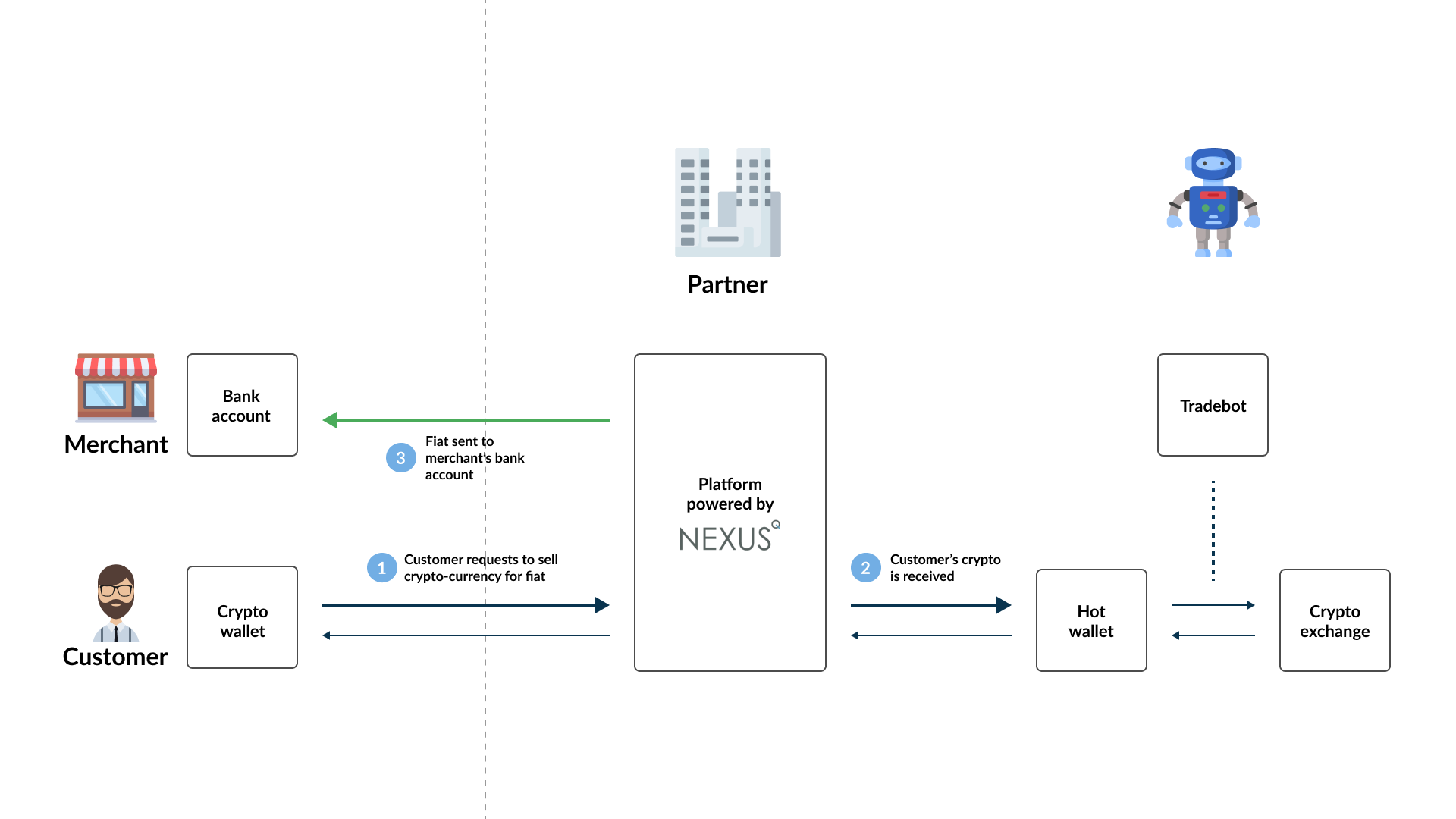
A Merchant transaction is similar to a Sell transaction and share the same transaction statuses as explained with the Sell transaction, but unlike a Sell transactions, a customer cannot send crypto-currency directly to a Deposit address without a Merchant transaction being created first. A Sell and Merchant transaction also differs in the sense that instead of the corresponding fiat amount of the crypto sold by the customer being paid out to the customer, it should be paid out to the merchant.
NOTE
When creating a Merchant transaction, the merchant's account needs to be specified and not the customer. It is not necessary to have an account for the customer in Nexus. A Merchant account can be created manually via the portal by creating a customer with the merchant's details, and selecting to create a Merchant account for that customer on the customer view.
Gift
There are cases where you want to reward customers (for example, for loyalty or constructive feedback) with an amount in crypto-currency or fiat currency. In Nexus, this is done through a gift transaction, which must be initiated by one of your Operators. Nexus determines the following for each gift:
- Fees: Nexus does not calculate any Fees for Gift transaction.
- Price: If the Gift is in Cryptocurrency, Nexus requests the buy price from the Price Exchange.
- Payout Amount: Nexus multiplies the requested amount with the sell price and subtracts the Fees from the result.
Tradebot
Terminology and detailed explanations have been separated. You can follow the links below:
- For the general concept and setup flow, see Tradebot overview
- For broker-specific behavior and settings, see Tradebot — Broker model